Monday, 11 April 2016
Magento : Add last increment id of "sales_flat_quote_item" in another table
Magento
$production = Mage::getSingleton('core/session')->getproValue($production); /* This is the session value which is set on Category/List page */
$shipping = Mage::getSingleton('core/session')->getshipValue($ship); /* This is the session value which is set on Category/List page */
/* This is code for Change Row Data of the product in cart and add Shipping charge in to that product into cart
* Changes By Rixit
// */
$connection = Mage::getSingleton('core/resource')
->getConnection('core_read');
$select = $connection->select()
->from('sales_flat_quote_item', array('MAX(item_id) as itn')); // select * from tablename or use array('id','name') selected values
$rowsArray = $connection->fetchAll($select); // return all rows
$rowArray =$connection->fetchRow($select); //return row
$temp = $rowArray['itn'];
$select1 = $connection->select()
->from('sales_flate_lastinsertd_id', array('MAX(last_inserted_id) as itn1')); // select * from tablename or use array('id','name') selected values
$rowsArray = $connection->fetchAll($select1); // return all rows
$rowArray =$connection->fetchRow($select1); //return row
$itnew = $rowArray['itn1'];
if( ($temp != $itnew) && ($temp >= $itnew) )
{
$total = $production + $shipping;
$connection = Mage::getSingleton('core/resource')
->getConnection('core_write');
$connection->beginTransaction();
$fields = array();
$fields['last_inserted_id']= $temp;
$fields['production_time']= $production;
$fields['shipping_time']= $shipping;
$fields['total']= $total;
$connection->insert('sales_flate_lastinsertd_id', $fields);
$connection->commit();
}
else
{
//echo "Riisdfs";
}
/*
* End of Changes By Rixit
// */
$shipping = Mage::getSingleton('core/session')->getshipValue($ship); /* This is the session value which is set on Category/List page */
/* This is code for Change Row Data of the product in cart and add Shipping charge in to that product into cart
* Changes By Rixit
// */
$connection = Mage::getSingleton('core/resource')
->getConnection('core_read');
$select = $connection->select()
->from('sales_flat_quote_item', array('MAX(item_id) as itn')); // select * from tablename or use array('id','name') selected values
$rowsArray = $connection->fetchAll($select); // return all rows
$rowArray =$connection->fetchRow($select); //return row
$temp = $rowArray['itn'];
$select1 = $connection->select()
->from('sales_flate_lastinsertd_id', array('MAX(last_inserted_id) as itn1')); // select * from tablename or use array('id','name') selected values
$rowsArray = $connection->fetchAll($select1); // return all rows
$rowArray =$connection->fetchRow($select1); //return row
$itnew = $rowArray['itn1'];
if( ($temp != $itnew) && ($temp >= $itnew) )
{
$total = $production + $shipping;
$connection = Mage::getSingleton('core/resource')
->getConnection('core_write');
$connection->beginTransaction();
$fields = array();
$fields['last_inserted_id']= $temp;
$fields['production_time']= $production;
$fields['shipping_time']= $shipping;
$fields['total']= $total;
$connection->insert('sales_flate_lastinsertd_id', $fields);
$connection->commit();
}
else
{
//echo "Riisdfs";
}
/*
* End of Changes By Rixit
// */
Thursday, 7 April 2016
Command Promt : php is not recognized as an internal or external command
Set PHP environment variable to the System for run PHP from CMD (Command Prompt)
Step 1 : Open properties of My Computer (Right Click on My Computer)
Step 2 : Click on "Advance system settings"
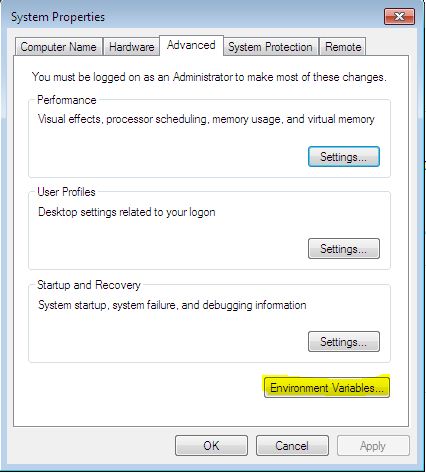
 Step 3 : Can see popup of "System Properties"
Click on "Environment Variable" button


Append C:\wamp\bin\php\php5.5.12; at last (Note :- replace php5.5.12 with your php version)

Step 5 : Close / Open CMD (Command Prompt) again
Now, It's solved !
Step 2 : Click on "Advance system settings"

Click on "Environment Variable" button
Step 4 : Can see popup of Environment Variable
Set System variable path for PHP

Append C:\wamp\bin\php\php5.5.12; at last (Note :- replace php5.5.12 with your php version)

Step 5 : Close / Open CMD (Command Prompt) again
Now, It's solved !
Magento 2 : CSS and Javascript no loading after installation
This is an initial issue with magento 2, After Installation Front-End and Back-End CSS / JS do not work.
Using following steps, it is getting work easily for magento 2 !
This is creating frontend / adminhtml directory to the "pub/static/" directory.
Using following steps, it is getting work easily for magento 2 !
This is creating frontend / adminhtml directory to the "pub/static/" directory.
Using Command Prompt(CMD) set CSS & JS for Magento2
Step 1 : Run CMD
Step 2 : Goto Magento installation directory using
CD wamp/www/[Magento dir.]
Step 3 : Run
php bin/magento setup:static-content:deploy
If you are getting problem of
"php is not recognized as an internal or external command" [Click here...]
Step 4 : Run
php bin/magento indexer:reindex
Step 5 : Delete Cache from
var/cache/[delete all dir.]
It's getting work for Front-end & Back-end !
Step 2 : Goto Magento installation directory using
CD wamp/www/[Magento dir.]
Step 3 : Run
php bin/magento setup:static-content:deploy
If you are getting problem of
"php is not recognized as an internal or external command" [Click here...]
Step 4 : Run
php bin/magento indexer:reindex
Step 5 : Delete Cache from
var/cache/[delete all dir.]
It's getting work for Front-end & Back-end !
Tuesday, 9 June 2015
Magento : Update cart price using the observer event
Hello Friends,
Using Observer,we have seen how to set the custome price, Check Here
Now, We are going for update the product with the custome price, because in magento, for the set any custome price, update custome price, there are different Observer Events which is help us for making proper customization.
A) Open Module Config.xml file which is located at etc directory of Module
[This module is same which we use for the Set Custome price]
B) Here, the code of observer event for update price
{Namespace}/{Module Name}/Model/Observer.php
D) In Observer.php add updatecustomprice function
Enjoy, This is work for me in Magento 1.7.0.2
Using Observer,we have seen how to set the custome price, Check Here
Now, We are going for update the product with the custome price, because in magento, for the set any custome price, update custome price, there are different Observer Events which is help us for making proper customization.
A) Open Module Config.xml file which is located at etc directory of Module
[This module is same which we use for the Set Custome price]
B) Here, the code of observer event for update price
Magento
<frontend>
...................
<events>
<checkout_cart_product_update_after> <!--Here Event Name as per your Requirement -->
<observers>
<{Namespace}_{Module Name}_Model_Observer>
<type>singleton</type>
<class>{Namespace}_{Module Name}__Model_Observer</class>
<method>updatecustomprice</method>
</{Namespace}_{Module Name}__Model_Observer>
</observers>
</checkout_cart_product_update_after>
</events>
.................
</frontend>
C) Now, Create or Update [if alreay you have] Observer.php in Model Directory...................
<events>
<checkout_cart_product_update_after> <!--Here Event Name as per your Requirement -->
<observers>
<{Namespace}_{Module Name}_Model_Observer>
<type>singleton</type>
<class>{Namespace}_{Module Name}__Model_Observer</class>
<method>updatecustomprice</method>
</{Namespace}_{Module Name}__Model_Observer>
</observers>
</checkout_cart_product_update_after>
</events>
.................
</frontend>
{Namespace}/{Module Name}/Model/Observer.php
D) In Observer.php add updatecustomprice function
Magento
class {Namespace}/{Module Name}_Model_Observer
{
public function updatecustomprice(Varien_Event_Observer $observer) {
$item = $observer->getQuoteItem();
$custom_vals = $_SESSION['custom_vals'];
if($custom_vals != '')
{
$additionalOptions = array(array(
'label' => '',
'value' => $custom_vals,
));
$item->addOption(array(
'code' => 'additional_options',
'value' => serialize($additionalOptions),
));
unset($_SESSION['custom_vals']);
}
$price = 123; //Here, set the Custom Price for Item
$item->setCustomPrice($price); // This set the Custom Price in Quote of cart
$item->setOriginalCustomPrice($price);
$item->getProduct()->setIsSuperMode(true);
}
}
E) Now, Clear all cache of site from admin{
public function updatecustomprice(Varien_Event_Observer $observer) {
$item = $observer->getQuoteItem();
$custom_vals = $_SESSION['custom_vals'];
if($custom_vals != '')
{
$additionalOptions = array(array(
'label' => '',
'value' => $custom_vals,
));
$item->addOption(array(
'code' => 'additional_options',
'value' => serialize($additionalOptions),
));
unset($_SESSION['custom_vals']);
}
$price = 123; //Here, set the Custom Price for Item
$item->setCustomPrice($price); // This set the Custom Price in Quote of cart
$item->setOriginalCustomPrice($price);
$item->getProduct()->setIsSuperMode(true);
}
}
Enjoy, This is work for me in Magento 1.7.0.2
Saturday, 6 June 2015
jQuery : Detect Mobile Device and identify company
jQuery
/*Detect device*/
function detectdevice()
{
/*This will return TRUE if its Mobile Device otherwise give False*/
return (/android|webos|iphone|ipad|ipod|blackberry|iemobile|opera mini/i.test(navigator.userAgent.toLowerCase()));
}
console.log(detectdevice());
function detectdevice()
{
/*This will return TRUE if its Mobile Device otherwise give False*/
return (/android|webos|iphone|ipad|ipod|blackberry|iemobile|opera mini/i.test(navigator.userAgent.toLowerCase()));
}
console.log(detectdevice());
jQuery : ID is exist or not !
jQuery
/*Check any ID exist or not*/
<div id='id1'></div>
<script type="text/javascript">
var id_exist = jQuery('#id1').length;
console.log(id_exist);
/*This will return 0 if ID not exist otherwise will get 1*/
</script>
<div id='id1'></div>
<script type="text/javascript">
var id_exist = jQuery('#id1').length;
console.log(id_exist);
/*This will return 0 if ID not exist otherwise will get 1*/
</script>
Subscribe to:
Posts (Atom)